Crypto Security 101: Protect Your Exchange Account
Essential security practices for cryptocurrency traders. Learn how to protect your Binance account from hackers and phishing attacks.

In crypto, security is everything. Unlike banks, there’s no fraud department to call if your funds are stolen. Here’s how to protect yourself.
Enable Two-Factor Authentication (2FA)
This is the single most important security step. Without 2FA, anyone with your password can access your account.
Best options (ranked by security):
- Hardware security key (YubiKey) — most secure
- Google Authenticator app — recommended
- SMS verification — least secure (vulnerable to SIM swapping)
Set up Google Authenticator at minimum. It takes 2 minutes and dramatically reduces your risk.
Set Up Anti-Phishing Code
Binance lets you set a custom anti-phishing code — a word or phrase that appears in every legitimate email from Binance. If you receive an email without your code, it’s a phishing attempt.
To set it up: Account → Security → Anti-Phishing Code
Use a Withdrawal Whitelist
Enable the withdrawal whitelist feature to only allow crypto withdrawals to pre-approved addresses. Even if someone gains access to your account, they can’t withdraw to an unknown address.
When you add a new address to the whitelist, there’s a 24-hour waiting period before it becomes active — giving you time to react if an unauthorized address was added.
Password Best Practices
- Use a unique password for your exchange account (never reuse passwords)
- Make it at least 16 characters long
- Use a password manager (Bitwarden, 1Password)
- Never share your password with anyone — exchange support will never ask for it
Recognize Phishing Attempts
Common crypto phishing tactics:
- Fake emails: “Your account has been compromised, click here to verify”
- Fake websites: Slightly misspelled domains (bìnance.com, binannce.com)
- Fake support: Scammers on social media posing as exchange support
- Fake airdrops: “Connect your wallet to claim free tokens”
Rule of thumb: If someone contacts you first about your crypto, it’s a scam.
Cold Storage for Long-Term Holdings
If you’re holding crypto long-term (not actively trading), consider moving it to a hardware wallet:
- Ledger Nano X/S Plus — most popular
- Trezor Model T — open source
- Keep small amounts on the exchange for active trading only
The saying goes: “Not your keys, not your coins.” Hardware wallets give you full control.
Regular Security Audits
Every month, check:
- Active sessions and devices in your account settings
- Email and phone number are still correct
- No unauthorized API keys created
- No unknown addresses in your withdrawal whitelist
- 2FA is still active and working
Stay vigilant. In crypto, security isn’t a one-time setup — it’s an ongoing practice.
Get 20% Off Binance Trading Fees with RATE20
New to Binance? Open the official signup page with RATE20 already applied for a 20% trading-fee discount. You do not need to copy or type the code. Review the referral details before completing registration.
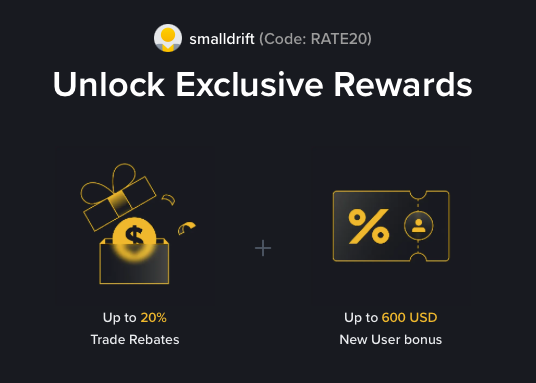
- Referral code: RATE20, pre-applied by this link
- Fee discount: 20%, shown on the Binance signup screen
- Additional rewards: Check Binance for current promotions and regional availability
Be wary of unofficial referral offers promising benefits they cannot show. The Binance signup screen lets you check the code and fee discount directly.
Compare Binance fees and available discounts →
SmallDrift may earn a commission when you sign up through this link. Trading involves risk, including loss of capital.
Related Articles
Explore Related Guides
Daily Crypto Market News
Follow Bitcoin price moves, major altcoins, and the events shaping the market.
Bitcoin ETF Flows Guide
Understand ETF inflows and outflows, and how to read them alongside price action.
Binance Fee Calculator
Learn how to estimate trading costs with referral and BNB discounts.
Verified Binance Referral Guide
See how RATE20 is applied and what to check on the Binance signup screen.