How to Read the Binance Order Book: A Beginner's Guide — Brazil Guide
Learn how to read and interpret the Binance order book. Understand bids, asks, depth, and how to use this information for better trades. Tailored for Brazil traders with BRL deposit methods.
For Brazil Traders
This guide is tailored for traders in Brazil. Sign up with referral code RATE20 for a 20% lifetime fee discount. Deposit BRL easily using local payment methods: PIX, Bank Transfer.
Brazil has strong crypto adoption. PIX makes instant payments easy and Binance supports BRL.
What Is an Order Book?
The order book shows all pending buy and sell orders for a trading pair at different price levels. It’s the heart of how exchange trading works.
Order Book Structure
Left Side: Bids (Buy Orders)
- Green colored
- Shows prices people are willing to buy at
- Sorted highest to lowest (best bid on top)
Right Side: Asks (Sell Orders)
- Red colored
- Shows prices people are willing to sell at
- Sorted lowest to highest (best ask on top)
The Spread
The gap between the best bid and best ask is the spread. Tighter spread = more liquid market.
Example:
- Best bid: $99,990
- Best ask: $100,010
- Spread: $20 (0.02%)
How to Read Depth
Each price level shows:
- Price: The order price
- Amount: How much crypto is available at that price
- Total: Cumulative amount from the best price
What the Order Book Tells You
Large Buy Wall
A very large bid at a specific price suggests strong support. Buyers are willing to absorb selling pressure at that level.
Large Sell Wall
A very large ask at a specific price suggests resistance. Sellers are waiting to dump at that level.
Thin Order Book
Few orders at each level means:
- Higher slippage for large orders
- More volatile price movements
- Be careful with market orders
Using the Order Book for Trading
1. Check Liquidity Before Trading
If you’re placing a large order, check the depth to estimate slippage.
2. Identify Support/Resistance
Large order clusters can act as temporary support or resistance.
3. Set Limit Orders Strategically
Place your limit orders at or near large bid/ask clusters for higher fill probability.
Limitations
- Spoofing: Large orders can be placed and cancelled to manipulate perception
- Hidden orders: Some orders are iceberg orders (only partially visible)
- Dynamic: The order book changes every millisecond
Pro Tip
On Binance, switch between the order book view and depth chart. The depth chart visualizes the order book as a graph, making it easier to spot support/resistance walls.
How to Deposit BRL on Binance
- Go to Trade → P2P on Binance
- Select Buy USDT with BRL
- Choose a payment method:
- PIX
- Bank Transfer
- Select a verified merchant and complete the trade
- Use your USDT to trade any cryptocurrency on Binance
Verify Before You Sign Up — Don't Get Scammed
Many sites advertise fake referral discounts that don't actually apply. Before signing up through any referral link, always verify the referral code and discount rate shown on the Binance registration page. Here's proof of our verified referral:
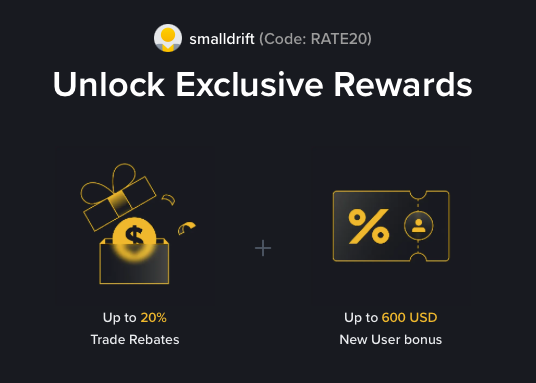
- Referral Code: RATE20
- Trade Rebate: Up to 20% on every trade (lifetime)
- New User Bonus: Up to 600 USD
If the registration page does not show these benefits, do not proceed. Only sign up when you can confirm the referral code and discount are applied.