How to Use the Binance Futures Calculator (PnL, Liquidation, ROE) — Malaysia Guide
Guide to using Binance's built-in futures calculator. Calculate profit/loss, liquidation price, and target price before trading. Tailored for Malaysia traders with MYR deposit methods.
For Malaysia Traders
This guide is tailored for traders in Malaysia. Sign up with referral code RATE20 for a 20% lifetime fee discount. Deposit MYR easily using local payment methods: Bank Transfer, Touch 'n Go.
Malaysia has licensed crypto exchanges. Binance P2P offers competitive MYR rates.
Binance Futures Calculator
Binance has a built-in calculator that helps you plan trades before executing them. Here’s how to use each function.
Accessing the Calculator
On the futures trading page, look for the calculator icon near the order entry panel.
1. PnL Calculator
Calculates your profit or loss based on entry and exit prices.
Inputs:
- Entry price
- Exit price
- Quantity (in contracts or coin amount)
Example:
- Long BTC at $100,000
- Exit at $105,000
- Quantity: 0.1 BTC
- PnL = 0.1 × ($105,000 - $100,000) = $500
2. Liquidation Price Calculator
Shows exactly where your position will be liquidated.
Inputs:
- Entry price
- Leverage
- Margin mode (cross/isolated)
- Position size
Example:
- Long BTC at $100,000
- 10x leverage, isolated margin
- Liquidation price ≈ $90,400
3. Target Price Calculator
Calculates the price needed to achieve your desired ROE.
Inputs:
- Entry price
- Leverage
- Target ROE percentage
Example:
- Long BTC at $100,000
- 10x leverage
- Target ROE: 50%
- Target price = $105,000 (5% move × 10x = 50% ROE)
4. Max Open Calculator
Shows the maximum position size you can open.
Based on:
- Available balance
- Leverage
- Current margin requirements
Tips for Using the Calculator
- Always check liquidation price before entering a trade
- Calculate fees — they reduce your actual PnL
- Factor in funding rates for longer-term positions
- Use target price to set realistic take-profit levels
- Consider slippage — actual execution may differ slightly
How to Deposit MYR on Binance
- Go to Trade → P2P on Binance
- Select Buy USDT with MYR
- Choose a payment method:
- Bank Transfer
- Touch 'n Go
- Select a verified merchant and complete the trade
- Use your USDT to trade any cryptocurrency on Binance
Verify Before You Sign Up — Don't Get Scammed
Many sites advertise fake referral discounts that don't actually apply. Before signing up through any referral link, always verify the referral code and discount rate shown on the Binance registration page. Here's proof of our verified referral:
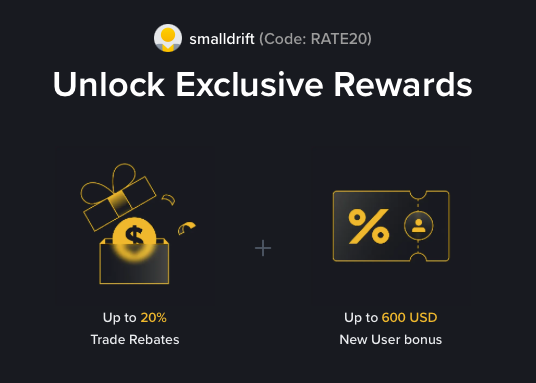
- Referral Code: RATE20
- Trade Rebate: Up to 20% on every trade (lifetime)
- New User Bonus: Up to 600 USD
If the registration page does not show these benefits, do not proceed. Only sign up when you can confirm the referral code and discount are applied.