How to Set Up 2FA on Binance (Google Authenticator Guide) — Brazil Guide
Protect your Binance account with two-factor authentication. Step-by-step 2FA setup guide with backup tips. Tailored for Brazil traders with BRL deposit methods.
For Brazil Traders
This guide is tailored for traders in Brazil. Sign up with referral code RATE20 for a 20% lifetime fee discount. Deposit BRL easily using local payment methods: PIX, Bank Transfer.
Brazil has strong crypto adoption. PIX makes instant payments easy and Binance supports BRL.
Why 2FA Is Essential
Two-factor authentication (2FA) prevents unauthorized access even if someone has your password. It’s the single most important security step.
Setting Up Google Authenticator
Step 1: Download the App
- iOS: Download “Google Authenticator” from App Store
- Android: Download from Google Play Store
Step 2: Enable in Binance
Go to Security → Google Authenticator → Enable
Step 3: Save Your Backup Key
Binance will show a 16-digit backup key. WRITE THIS DOWN AND STORE IT SAFELY.
If you lose your phone without this key, you may lose access to your account.
Step 4: Scan the QR Code
Open Google Authenticator → tap + → Scan QR code → scan the code on screen.
Step 5: Enter the 6-Digit Code
The app will show a 6-digit code that changes every 30 seconds. Enter the current code to confirm setup.
Backup Your 2FA Key
Critical: Store the backup key in multiple safe locations:
- Written on paper in a secure location
- In a password manager (encrypted)
- NOT in a screenshot on your phone
Common 2FA Issues
Code doesn’t work?
- Ensure your phone’s time is synced (Settings → Date/Time → Automatic)
- Enter the code quickly — it changes every 30 seconds
- Make sure you’re scanning the right QR code
Lost your phone?
- Use your backup key to restore in Google Authenticator
- If no backup key, contact Binance support (slow process)
2FA Alternatives
| Method | Security Level |
|---|---|
| Hardware key (YubiKey) | Highest |
| Google Authenticator | High |
| SMS verification | Medium (SIM swap risk) |
| Email only | Low (not recommended) |
How to Deposit BRL on Binance
- Go to Trade → P2P on Binance
- Select Buy USDT with BRL
- Choose a payment method:
- PIX
- Bank Transfer
- Select a verified merchant and complete the trade
- Use your USDT to trade any cryptocurrency on Binance
Verify Before You Sign Up — Don't Get Scammed
Many sites advertise fake referral discounts that don't actually apply. Before signing up through any referral link, always verify the referral code and discount rate shown on the Binance registration page. Here's proof of our verified referral:
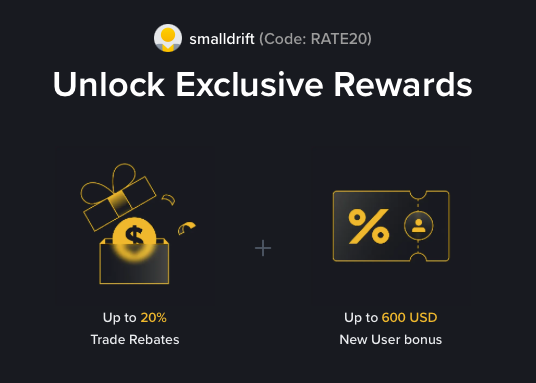
- Referral Code: RATE20
- Trade Rebate: Up to 20% on every trade (lifetime)
- New User Bonus: Up to 600 USD
If the registration page does not show these benefits, do not proceed. Only sign up when you can confirm the referral code and discount are applied.