Binance Withdrawal Fees 2026: How to Save on Every Withdrawal — South Korea Guide
Complete guide to Binance withdrawal fees by coin and network. Learn which network is cheapest for each cryptocurrency. Tailored for South Korea traders with KRW deposit methods.
For South Korea Traders
This guide is tailored for traders in South Korea. Sign up with referral code RATE20 for a 20% lifetime fee discount. Deposit KRW easily using local payment methods: Bank Transfer.
South Korea has a very active crypto market. Binance offers lower fees and more altcoins than local exchanges.
Binance Withdrawal Fee Guide
Binance charges a flat fee per withdrawal that varies by coin and network. Choosing the right network can save you significant money.
Common Withdrawal Fees
| Crypto | Network | Fee | Fee in USD (approx) |
|---|---|---|---|
| BTC | Bitcoin | 0.0005 BTC | ~$50 |
| BTC | Lightning | 0 BTC | Free |
| ETH | Ethereum | 0.001 ETH | ~$3 |
| ETH | Arbitrum | 0.0001 ETH | ~$0.30 |
| USDT | TRC-20 | 1 USDT | $1 |
| USDT | ERC-20 | 3-20 USDT | $3-20 |
| USDT | BSC | 0.29 USDT | $0.29 |
| USDT | Arbitrum | 0.5 USDT | $0.50 |
| USDC | Arbitrum | 0.5 USDC | $0.50 |
| SOL | Solana | 0.01 SOL | ~$1.50 |
Cheapest Withdrawal Methods
For Stablecoins (USDT/USDC)
- BSC (BEP-20): ~$0.29
- TRC-20: ~$1.00
- Arbitrum: ~$0.50
Avoid ERC-20 for stablecoins — it’s often 10-50x more expensive.
For Bitcoin
- Lightning Network: Free
- Bitcoin network: ~$50
If the receiving wallet supports Lightning, always use it.
How to Choose a Network
- Check if the receiving platform supports the network
- Compare fees on the withdrawal page
- Consider confirmation time (some networks are faster)
- Use the cheapest compatible network
Pro Tips
- Batch withdrawals: Instead of 10 small withdrawals, do 1 large one
- Time your withdrawals: Network fees can vary by time of day
- Use Lightning for BTC: Free and instant
- Convert to low-fee coins: If withdrawing to another exchange, convert to XLM or XRP first (near-zero fees)
How to Deposit KRW on Binance
- Go to Trade → P2P on Binance
- Select Buy USDT with KRW
- Choose a payment method:
- Bank Transfer
- Select a verified merchant and complete the trade
- Use your USDT to trade any cryptocurrency on Binance
Verify Before You Sign Up — Don't Get Scammed
Many sites advertise fake referral discounts that don't actually apply. Before signing up through any referral link, always verify the referral code and discount rate shown on the Binance registration page. Here's proof of our verified referral:
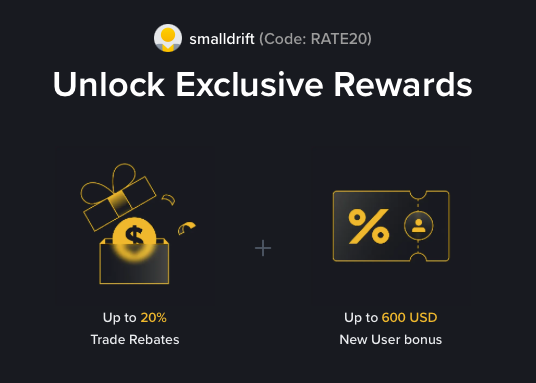
- Referral Code: RATE20
- Trade Rebate: Up to 20% on every trade (lifetime)
- New User Bonus: Up to 600 USD
If the registration page does not show these benefits, do not proceed. Only sign up when you can confirm the referral code and discount are applied.