Binance P2P Trading Guide: Buy Crypto with Local Currency — India Guide
How to buy and sell cryptocurrency using Binance P2P. Step-by-step guide for safe peer-to-peer trading. Tailored for India traders with INR deposit methods.
For India Traders
This guide is tailored for traders in India. Sign up with referral code RATE20 for a 20% lifetime fee discount. Deposit INR easily using local payment methods: UPI, IMPS, Bank Transfer.
India has a 1% TDS on crypto transactions. P2P via UPI is the most popular way to buy USDT.
What Is Binance P2P?
P2P (peer-to-peer) trading lets you buy and sell crypto directly with other users using local payment methods — bank transfer, mobile payment, cash, etc.
How P2P Works
- Buyer places an order for USDT/BTC/etc
- Seller receives notification
- Buyer sends payment via local method
- Seller confirms receipt
- Binance releases crypto from escrow to buyer
Binance holds the crypto in escrow during the trade, protecting both parties.
Step-by-Step: Buying on P2P
Step 1: Go to P2P
Navigate to Trade → P2P
Step 2: Select Your Options
- Choose Buy
- Select crypto (USDT recommended)
- Select your local currency
- Choose payment method
Step 3: Pick a Seller
- Look for sellers with high completion rates (>95%)
- Check for the Verified Merchant badge
- Compare prices across sellers
Step 4: Place Order
Enter the amount you want to buy and confirm.
Step 5: Make Payment
Transfer funds using the seller’s specified payment method. Follow their exact instructions.
Step 6: Confirm Payment
Click “I’ve Paid” after sending the money. Wait for the seller to verify and release crypto.
P2P Safety Tips
- Only trade with verified merchants
- Never release payment outside the platform
- Don’t share personal info beyond what’s needed
- Keep proof of payment (screenshot)
- Complete within the time limit or the order cancels
- Never accept overpayment — it’s a common scam
P2P Fees
Binance charges zero fees on P2P trading. The prices you see already include the seller’s markup.
When to Use P2P
- Your country doesn’t support direct bank deposits on Binance
- You want to buy with local currency
- Bank transfers to exchanges are blocked
- You prefer paying with mobile money or cash
How to Deposit INR on Binance
- Go to Trade → P2P on Binance
- Select Buy USDT with INR
- Choose a payment method:
- UPI
- IMPS
- Bank Transfer
- Select a verified merchant and complete the trade
- Use your USDT to trade any cryptocurrency on Binance
Verify Before You Sign Up — Don't Get Scammed
Many sites advertise fake referral discounts that don't actually apply. Before signing up through any referral link, always verify the referral code and discount rate shown on the Binance registration page. Here's proof of our verified referral:
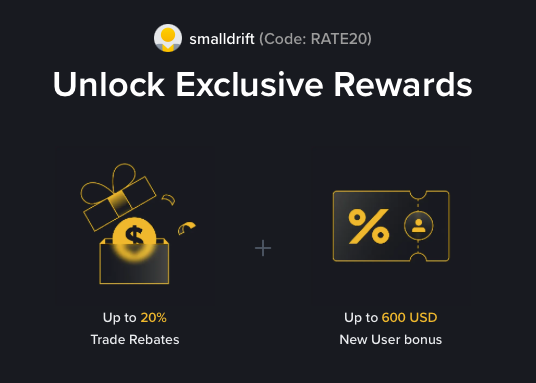
- Referral Code: RATE20
- Trade Rebate: Up to 20% on every trade (lifetime)
- New User Bonus: Up to 600 USD
If the registration page does not show these benefits, do not proceed. Only sign up when you can confirm the referral code and discount are applied.