Binance Mobile App Guide: Trade Crypto on Your Phone — UAE Guide
Complete guide to the Binance mobile app. Setup, navigation, trading, and essential features for mobile crypto trading. Tailored for UAE traders with AED deposit methods.
For UAE Traders
This guide is tailored for traders in UAE. Sign up with referral code RATE20 for a 20% lifetime fee discount. Deposit AED easily using local payment methods: Bank Transfer, ADCB, Emirates NBD.
The UAE is a crypto-friendly hub. Binance has a local license and supports AED.
Getting the Binance App
Download
- iOS: App Store → search “Binance”
- Android: Google Play → search “Binance”
- APK: Available from Binance website (for regions where Play Store is restricted)
Warning: Only download from official sources. Fake apps exist.
First-Time Setup
- Log in with your Binance account
- Complete biometric authentication (Face ID/fingerprint)
- Enable notifications for price alerts and orders
- Choose Binance Lite or Pro mode
Lite vs Pro Mode
| Feature | Lite | Pro |
|---|---|---|
| Interface | Simple buy/sell | Full trading view |
| Charts | Basic | Advanced (TradingView) |
| Order types | Market only | All types |
| Best for | Beginners | Active traders |
You can switch between modes anytime in settings.
Key App Features
Trading
- Spot, futures, and margin trading
- Real-time charts with indicators
- All order types (limit, market, stop, OCO)
- Quick buy/sell in Lite mode
Portfolio
- Real-time portfolio value
- P&L tracking
- Asset distribution chart
Alerts
- Price alerts for any coin
- Order fill notifications
- Significant price movement alerts
Security
- Biometric login
- Transaction PIN
- App lock
Mobile Trading Tips
- Use Lite mode for simple purchases
- Set price alerts instead of watching charts
- Use limit orders — don’t rush trades on small screens
- Enable biometric lock for security
- Download on both phone and tablet — use tablet for chart analysis
Mobile vs Desktop
| Task | Mobile | Desktop |
|---|---|---|
| Quick trades | Great | Good |
| Chart analysis | Limited | Superior |
| Portfolio check | Great | Good |
| Complex orders | Adequate | Better |
| Security management | Good | Better |
How to Deposit AED on Binance
- Go to Trade → P2P on Binance
- Select Buy USDT with AED
- Choose a payment method:
- Bank Transfer
- ADCB
- Emirates NBD
- Select a verified merchant and complete the trade
- Use your USDT to trade any cryptocurrency on Binance
Verify Before You Sign Up — Don't Get Scammed
Many sites advertise fake referral discounts that don't actually apply. Before signing up through any referral link, always verify the referral code and discount rate shown on the Binance registration page. Here's proof of our verified referral:
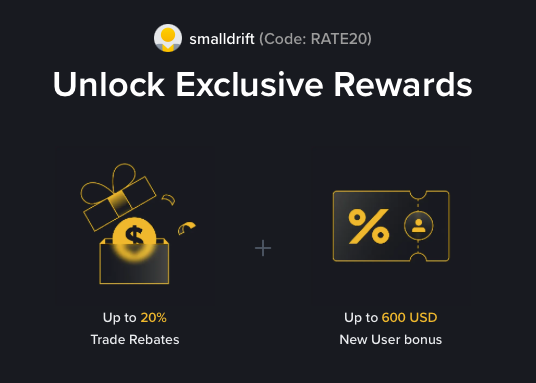
- Referral Code: RATE20
- Trade Rebate: Up to 20% on every trade (lifetime)
- New User Bonus: Up to 600 USD
If the registration page does not show these benefits, do not proceed. Only sign up when you can confirm the referral code and discount are applied.