Binance Futures Order Types Explained (With Examples) — Egypt Guide
Complete guide to all Binance futures order types: market, limit, stop, trailing stop, and more. When and how to use each. Tailored for Egypt traders with EGP deposit methods.
For Egypt Traders
This guide is tailored for traders in Egypt. Sign up with referral code RATE20 for a 20% lifetime fee discount. Deposit EGP easily using local payment methods: Bank Transfer, Vodafone Cash.
Egypt's crypto adoption is growing despite regulatory uncertainty.
Order Types Overview
Binance futures offers several order types. Understanding each one is essential for effective trading.
1. Market Order
Fills immediately at the best available price.
- Use when: You need to enter/exit NOW
- Fee: Taker fee (0.05%, or 0.04% with referral)
- Downside: May get slippage on large orders
2. Limit Order
Fills only at your specified price or better.
- Use when: You want a specific entry/exit price
- Fee: Maker fee (0.02%, or 0.016% with referral)
- Downside: May never fill if price doesn’t reach your level
3. Stop Market Order
Triggers a market order when price reaches your stop price.
- Use for: Stop-losses
- How it works: Price hits stop → market order executes
- Downside: Slippage possible during volatile moves
4. Stop Limit Order
Triggers a limit order when price reaches your stop price.
- Use for: Stop-losses with price control
- How it works: Price hits stop → limit order placed at limit price
- Downside: May not fill if price moves through your limit
5. Take Profit Market/Limit
Same as stop orders but for profit-taking.
- TP Market: Guaranteed fill at market price
- TP Limit: Fill at your price or better
6. Trailing Stop Order
Moves your stop-loss as the price moves in your favor.
- Use for: Locking in profits while letting winners run
- Callback rate: The percentage of pullback that triggers the stop
- Example: 2% callback on a long → stop moves up as price rises, triggers if price drops 2% from peak
7. Post-Only Order
Only places maker orders. If the order would be a taker, it’s rejected.
- Use for: Ensuring you always pay maker fees
- Fee: Always maker fee (lowest)
Order Strategy for Beginners
- Entry: Limit order (lower fees)
- Stop-loss: Stop market (guaranteed fill)
- Take-profit: TP limit (save on fees)
Pro Tip: OCO Orders
OCO (One-Cancels-the-Other) lets you set both a take-profit and stop-loss simultaneously. When one triggers, the other is automatically cancelled.
How to Deposit EGP on Binance
- Go to Trade → P2P on Binance
- Select Buy USDT with EGP
- Choose a payment method:
- Bank Transfer
- Vodafone Cash
- Select a verified merchant and complete the trade
- Use your USDT to trade any cryptocurrency on Binance
Verify Before You Sign Up — Don't Get Scammed
Many sites advertise fake referral discounts that don't actually apply. Before signing up through any referral link, always verify the referral code and discount rate shown on the Binance registration page. Here's proof of our verified referral:
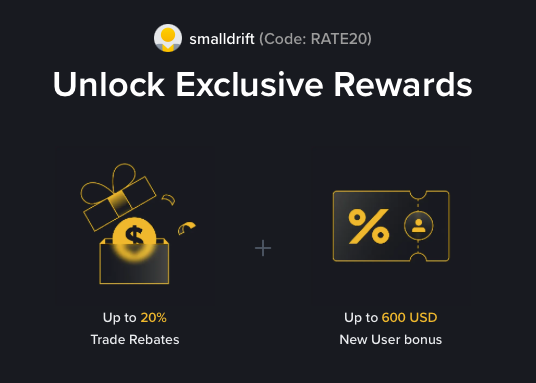
- Referral Code: RATE20
- Trade Rebate: Up to 20% on every trade (lifetime)
- New User Bonus: Up to 600 USD
If the registration page does not show these benefits, do not proceed. Only sign up when you can confirm the referral code and discount are applied.