Binance API Trading: How to Set Up Automated Trading Bots — South Korea Guide
Guide to Binance API trading. Create API keys, connect trading bots, and automate your trading strategy. Tailored for South Korea traders with KRW deposit methods.
For South Korea Traders
This guide is tailored for traders in South Korea. Sign up with referral code RATE20 for a 20% lifetime fee discount. Deposit KRW easily using local payment methods: Bank Transfer.
South Korea has a very active crypto market. Binance offers lower fees and more altcoins than local exchanges.
What Is API Trading?
API (Application Programming Interface) trading lets you connect external software — trading bots, custom scripts, or portfolio managers — to your Binance account.
Creating API Keys
- Go to Account → API Management
- Click Create API
- Choose API type:
- System Generated: Standard API key
- Self-Generated: For advanced users (Ed25519)
- Name your API key
- Complete security verification
- Save your API Key and Secret Key
Important: The Secret Key is shown only once. Save it securely.
API Key Security
Permissions
| Permission | Enable? |
|---|---|
| Read | Yes (always needed) |
| Spot Trading | Yes (if trading) |
| Futures Trading | Yes (if trading futures) |
| Withdrawals | NO (never enable for bots) |
IP Restrictions
Always restrict API keys to specific IP addresses. This prevents unauthorized use even if the key is leaked.
Popular Trading Bots
| Bot | Type | Cost |
|---|---|---|
| 3Commas | Cloud-based | $14.50+/mo |
| Pionex | Built-in bots | Free |
| Hummingbot | Open source | Free |
| Freqtrade | Open source | Free |
| Custom Python | DIY | Free |
Basic Python Example
# Install: pip install python-binance
from binance.client import Client

client = Client(api_key, api_secret)

# Get BTC price
ticker = client.get_symbol_ticker(symbol="BTCUSDT")
print(f"BTC Price: {ticker['price']}")

# Place a limit buy order
order = client.create_order(
    symbol='BTCUSDT',
    side='BUY',
    type='LIMIT',
    quantity=0.001,
    price='95000',
    timeInForce='GTC'
)
Rate Limits
Binance enforces API rate limits:
- 1200 requests per minute for order-related endpoints
- 2400 weight per minute for general endpoints
- Exceeding limits results in temporary IP ban
Tips
- Start with testnet — Binance has a futures testnet for testing
- Never enable withdrawal permission on bot API keys
- Always use IP restrictions
- Monitor bot performance — don’t set and forget
- Use WebSocket for real-time data instead of polling
How to Deposit KRW on Binance
- Go to Trade → P2P on Binance
- Select Buy USDT with KRW
- Choose a payment method:
- Bank Transfer
- Select a verified merchant and complete the trade
- Use your USDT to trade any cryptocurrency on Binance
Verify Before You Sign Up — Don't Get Scammed
Many sites advertise fake referral discounts that don't actually apply. Before signing up through any referral link, always verify the referral code and discount rate shown on the Binance registration page. Here's proof of our verified referral:
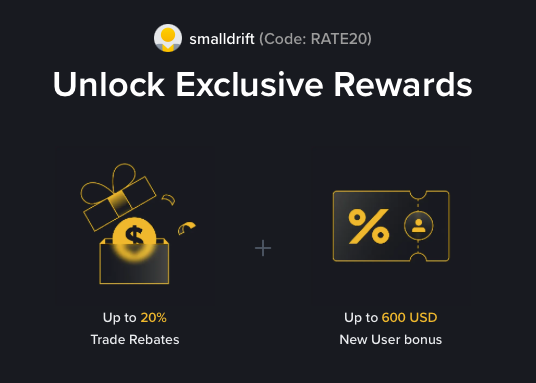
- Referral Code: RATE20
- Trade Rebate: Up to 20% on every trade (lifetime)
- New User Bonus: Up to 600 USD
If the registration page does not show these benefits, do not proceed. Only sign up when you can confirm the referral code and discount are applied.