How to Set Up Binance Account Step by Step (with Fee Discount)
Complete guide to creating a Binance account in 2026 with a referral code for 20% lifetime fee discount. Covers registration, KYC, 2FA, and first deposit.
Why Your Binance Setup Matters More Than You Think
The way you create your Binance account determines how much you’ll pay in fees for the lifetime of that account. A 20% fee discount — applied at registration — is permanent and cannot be added later.
Most guides skip this critical detail. This one doesn’t.
Before You Start
You’ll need:
- An email address (or phone number)
- A government-issued ID (passport, driver’s license, or national ID)
- About 15 minutes
Step 1: Open the Registration Page with Referral Code
Go to the Binance registration page using referral code RATE20. This pre-fills the referral field and locks in a 20% trading fee discount.
Critical: Verify that the referral code field shows RATE20 on the registration page. If the field is empty, the discount won’t be applied. You cannot add a referral code after account creation.
What the referral code gives you:
- 20% off spot trading fees (permanently)
- 20% off futures trading fees (permanently)
- 20% off margin trading fees (permanently)
- Applies to every trade, no minimum volume, no expiration
Step 2: Create Your Account
- Choose Register with Email (recommended) or phone number
- Enter your email address
- Create a strong password:
- At least 8 characters
- Include uppercase and lowercase letters
- Include at least one number
- Include a special character for extra security
- Verify the referral code field shows RATE20
- Accept the Terms of Service
- Click Create Account
Email verification:
Binance will send a 6-digit verification code to your email. Enter it within 30 minutes. If you don’t see the email:
- Check your spam/junk folder
- Check your promotions tab (Gmail)
- Try the “Resend” button after 60 seconds
- Make sure you entered the correct email address
Step 3: Complete KYC Verification
KYC (Know Your Customer) verification is required to deposit, trade, and withdraw on Binance. Without it, your account has zero functionality.
What you’ll need:
- Government-issued ID (passport, driver’s license, or national ID card)
- Your face visible for a selfie/liveness check
- Good lighting and a stable internet connection
The process:
- Go to Identification in your account settings
- Select Verify next to Personal Verification
- Enter your full legal name, date of birth, and address
- Choose your ID type and country
- Upload photos of your ID (front and back for cards, photo page for passports)
- Complete the facial verification (you may need to follow on-screen instructions like turning your head)
- Wait for approval
How long does verification take?
- Typical: 5-15 minutes (automated review)
- Manual review: Up to 24-48 hours (during high-demand periods or if photos are unclear)
Tips for fast approval:
- Use a passport (highest approval rate)
- Take photos in good lighting, no glare
- Make sure all text on the ID is readable
- Don’t wear glasses or hats for the selfie
- Use a stable internet connection (the liveness check needs consistent video)
Step 4: Enable Two-Factor Authentication (2FA)
This is not optional. Accounts without 2FA are vulnerable to unauthorized access, and Binance may limit your withdrawal amounts without it.
Option 1: Google Authenticator (Recommended)
- Download Google Authenticator (iOS or Android)
- Go to Security → Authenticator App
- Scan the QR code with the app
- Save the backup key somewhere secure (written down, not a screenshot)
- Enter the 6-digit code from the app to confirm
Option 2: Hardware Security Key (Most Secure)
- Go to Security → Security Key
- Insert your YubiKey or compatible hardware key
- Follow the on-screen setup instructions
Option 3: SMS Verification (Least Secure)
- Convenient but vulnerable to SIM swap attacks
- Use only as a backup method, not your primary 2FA
Additional security setup:
- Anti-phishing code: Set a unique code that appears in all genuine Binance emails. This helps you identify phishing attempts.
- Withdrawal whitelist: Only allow withdrawals to pre-approved addresses. New addresses require a 24-hour waiting period.
- Device management: Review and remove unrecognized devices from your account.
Step 5: Enable BNB Fee Payment
This step gives you an additional 25% off trading fees, stacking with your referral discount.
- Buy a small amount of BNB (even $10-20 is enough)
- Go to Trade → Spot → search for BNB/USDT
- Buy BNB at market price
- Go to your Dashboard or Settings
- Find “Use BNB for Fees” and toggle it ON
- Binance will now automatically deduct trading fees from your BNB balance
Your fee after this step:
- Spot: ~0.06% (down from 0.10% base)
- Futures: ~0.036% taker (down from 0.05% base)
Step 6: Make Your First Deposit
Option A: Deposit Crypto
If you already hold crypto on another exchange or wallet:
- Go to Wallet → Deposit
- Select the cryptocurrency you want to deposit
- Choose the network (important — use the same network as the sending platform)
- Copy the deposit address
- Send from your external wallet
Network tips:
- BTC: Use Bitcoin network (only option)
- ETH: Use Ethereum or Arbitrum (Arbitrum is cheaper)
- USDT: Use TRC-20 (cheapest, ~$1) or BSC ($0.29), avoid ERC-20 ($5-20)
Option B: Buy with Credit/Debit Card
- Go to Buy Crypto → Credit/Debit Card
- Enter the amount
- Complete the payment
- Note: Card purchases have a 2% fee — this is the most expensive deposit method
Option C: P2P Trading (Best for Local Currency)
- Go to Trade → P2P
- Select Buy → Choose USDT
- Select your currency and payment method
- Choose a verified merchant
- Follow the payment instructions
- USDT is released to your account after the merchant confirms
P2P is the best option for most countries where direct bank deposits aren’t available. The fees are built into the exchange rate, typically 0-2% above market.
Step 7: Start Trading
Your account is now set up with:
- 20% referral fee discount (permanent)
- 25% BNB fee discount (stacking)
- Effective spot fee: ~0.06%
- Fully verified with 2FA security
Quick start for spot trading:
- Go to Trade → Spot
- Search for a trading pair (e.g., BTC/USDT)
- Use Limit order type (cheaper than market orders)
- Enter your price and quantity
- Click Buy or Sell
Quick start for futures:
- Go to Derivatives → USDT-M Futures
- Transfer USDT from spot to futures wallet
- Select a trading pair and leverage (start low — 2-3x)
- Place your order with a stop-loss
Common Setup Mistakes
- Forgetting the referral code: Can’t be added later. If you missed it, create a new account with a different email.
- Skipping BNB fee payment: Many users don’t know about this. Enable it now.
- Using SMS as primary 2FA: Use Google Authenticator instead. SMS is vulnerable to SIM swap attacks.
- Not saving 2FA backup key: If you lose your phone without the backup key, recovering your account takes weeks.
- Depositing via wrong network: Always double-check the network matches on both sending and receiving side. Sending to the wrong network can result in permanent loss of funds.
Your Setup Checklist
- Registered with referral code RATE20
- Email verified
- KYC verification approved
- Google Authenticator 2FA enabled
- 2FA backup key saved securely
- Anti-phishing code set
- BNB purchased and fee payment enabled
- First deposit made
- Withdrawal whitelist configured
Complete all 9 steps and you have a fully optimized, secure Binance account with the lowest possible fee structure available to new users.
Get 20% Off Binance Trading Fees with RATE20
New to Binance? Open the official signup page with RATE20 already applied for a 20% trading-fee discount. You do not need to copy or type the code. Review the referral details before completing registration.
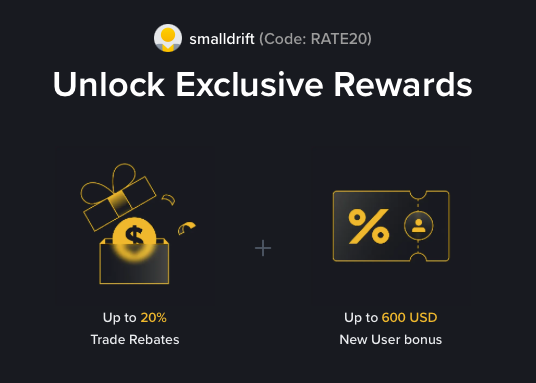
- Referral code: RATE20, pre-applied by this link
- Fee discount: 20%, shown on the Binance signup screen
- Additional rewards: Check Binance for current promotions and regional availability
Be wary of unofficial referral offers promising benefits they cannot show. The Binance signup screen lets you check the code and fee discount directly.
Compare Binance fees and available discounts →
SmallDrift may earn a commission when you sign up through this link. Trading involves risk, including loss of capital.
Related Articles
Explore Related Guides
Daily Crypto Market News
Follow Bitcoin price moves, major altcoins, and the events shaping the market.
Bitcoin ETF Flows Guide
Understand ETF inflows and outflows, and how to read them alongside price action.
Binance Fee Calculator
Learn how to estimate trading costs with referral and BNB discounts.
Verified Binance Referral Guide
See how RATE20 is applied and what to check on the Binance signup screen.